
Custom School Report Card: How Our Customers Drive Innovation
Modern schools expect more from a school report card than a simple list of marks. Today, reports must reflect a school’s teaching philosophy, combine numeric grades with meaningful teacher feedback, and adapt to unique curricula and subjects.
At Rise School Management, innovation starts with real school needs. This case shows how customer requests led us to build a flexible custom school report card maker - without breaking system configuration or adding technical complexity.
The Challenge: When Standard Progress Reports Don’t Work
Two schools approached us with the same core problem:
their student progress report requirements could not be met using a standard report card template.
They needed:
- A combination of numeric grades and text-based teacher comments
- Support for non-standard subjects and skills
- Custom fields not available in the default system
- A professional, branded school report card ready for printing and sharing with parents
At that time:
- Custom print forms required configuration changes
- Progress Reports had a fixed structure
- New requirements always meant developer involvement
This limited flexibility and slowed down schools.
Real School Report Card Example
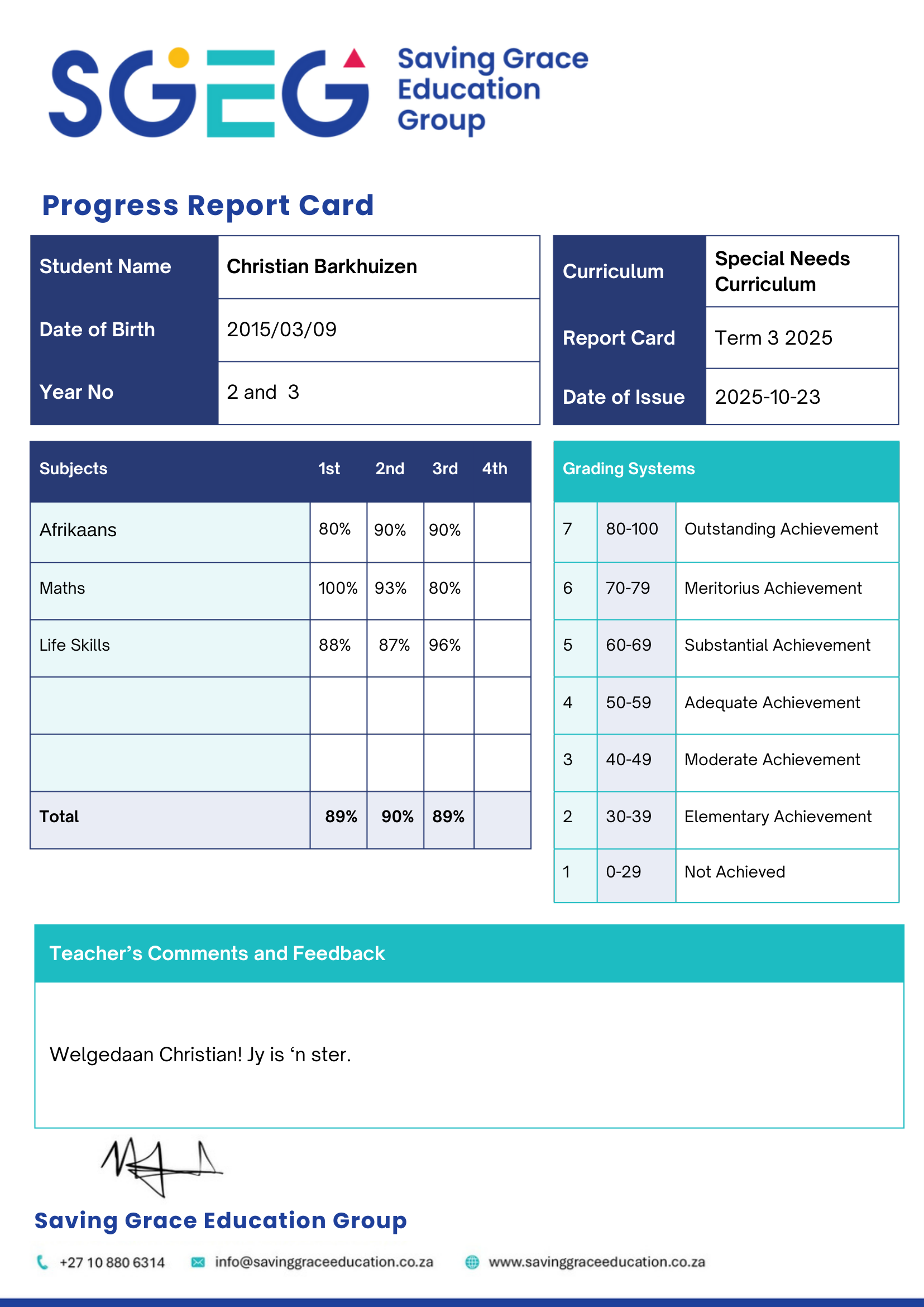
One of the pilot schools, Saving Grace School, needed a progress report that included:
- Subject-based percentage results
- Clear grading bands and achievement descriptions
- Teacher comments in free text
- A layout aligned with the school’s branding and standards
Another case focused on a Computer Skills & Coding Report, where:
- Traditional marks were not suitable
- Teachers assessed progress per topic
- Grades were represented differently from academic subjects
These examples clearly showed that schools need a custom school report card, not a rigid template.
The Solution: A Flexible School Report Card Maker
We designed and implemented a solution that allows schools to create fully customised progress reports in user mode, without changing system configuration.
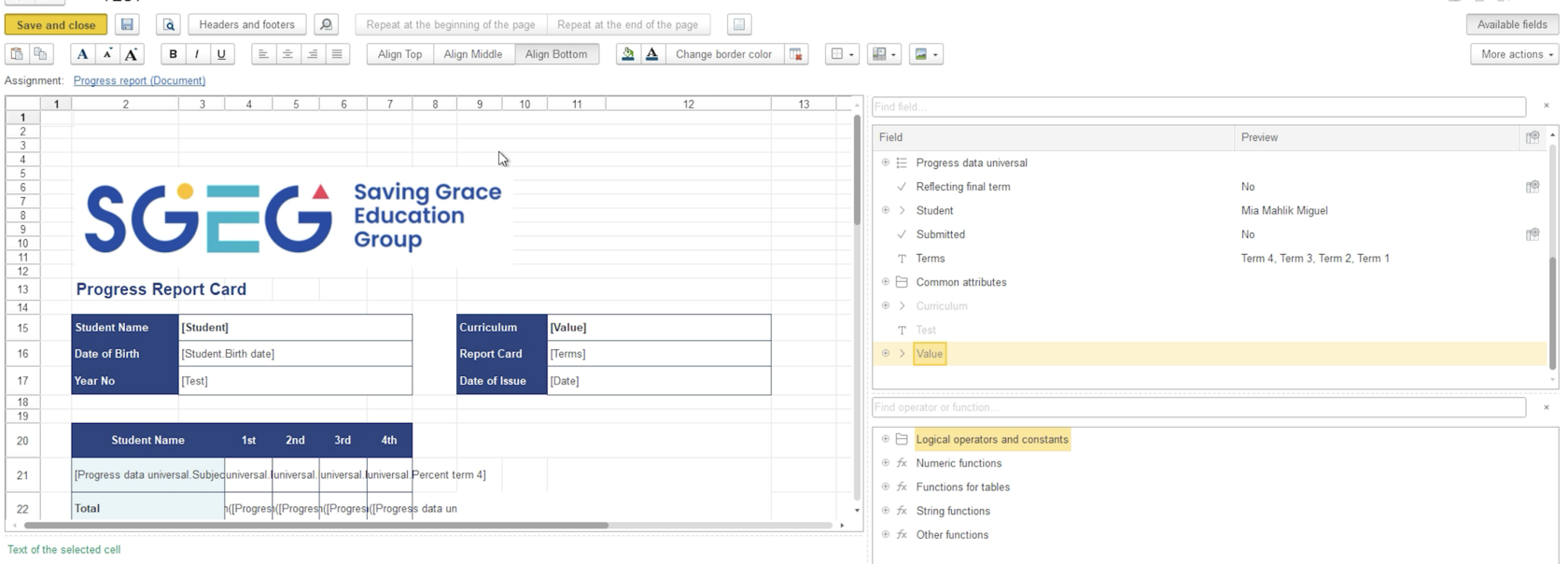
Custom Print Forms
Schools can now:
- Upload and manage their own report card layouts
- Apply branding and custom structures
- Update designs independently
- Use different layouts per school or report type
This turns Rise into a true school report card maker, controlled by the school — not developers.
Additional Attributes (Custom Fields)
Many schools need data fields that don’t exist in standard systems:
- Skills indicators
- Curriculum-specific outcomes
- Teacher observations
- Custom codes and descriptors
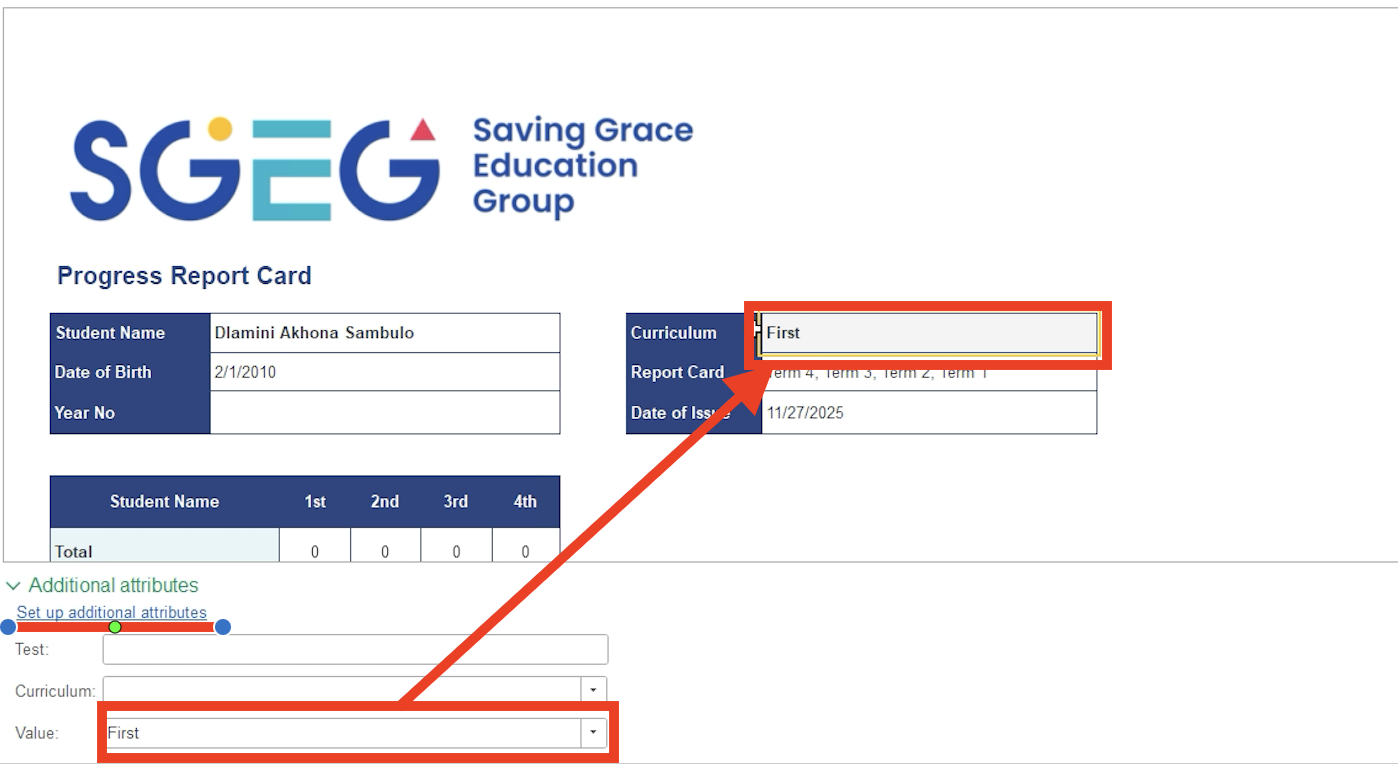
We introduced Additional Attributes, allowing schools to:
- Add custom fields to Progress Reports
- Create new attributes on the fly
- Avoid programming or configuration changes
Data + Design Working Together
The key innovation is how both systems work together.
Data entered via Additional Attributes becomes instantly available in Custom Print Forms.
This allows schools to design and print fully personalised student progress reports with complete flexibility.
The Result: Custom School Report Cards Without Code Changes
The outcome is a scalable, flexible reporting system that delivers:
- Custom layouts per school
- Support for numeric and narrative assessment
- School-specific fields and structures
- No configuration updates
- No developer involvement for each new report
For Saving Grace School, we delivered a fully customised Progress Report that matched their requirements exactly — without a single configuration change.
👉 Talk to a Rise School Expert
Not sure how a custom school report card would work for your school?
Our team will help you:
- Design a custom student progress report
- Combine grades and teacher feedback
- Adapt reports to your curriculum
- Get started quickly and confidently
👉 Talk to a Rise School Expert
Want to see how reporting fits into the bigger picture?
Download our System Overview PDF to explore:
- Core modules of Rise School Management
- How academic data flows into reports
- Why the system scales with your school
- How customisation works in practice
👉 View System Overview (PDF)
Frequently Asked Questions
Have questions about custom school report cards or implementation?
Our FAQ covers:
- How custom print forms work
- What can be customised without coding
- Setup and onboarding timelines
- Data security and access control
- Support for different curricula
👉 Read the FAQ
Final Thought
Every school is different. Your school report card should reflect how you teach, assess, and communicate progress.
With Rise School Management, your reporting adapts to your school — not the other way around.