
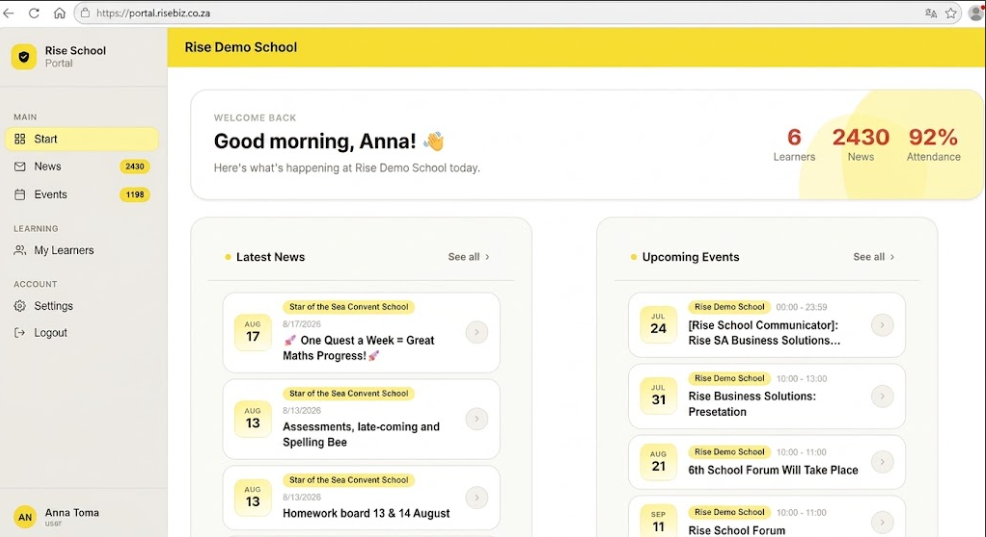
#Desktop_Portal_for_Parents. Further to many requests from schools, we are excited to share that the first release of the Desktop portal for parents is ready.
Parents can view News, Events and Progress reports - the same as on the Communicator app - via the Portal. The link is https://portal.risebiz.co.za/
It is work in progress. The team is working on adding other aspects, like Resources, Chats.
For now, News, Events, Progress reports work well. We have done extensive internal testing and are extending an invitation to all School Staff, to try it out.
1. Parents / School Staff can login to the Portal using the SAME logins as on the Communicator app.
2. It is also possible to create a New Account and link to your school on the Portal using the 6-digit code, if they do not have a Communicator app on the phone. @School Staff, please feel free to extend a link and an invitation to the parents / guardians, to start using the Portal.
3. The Portal can be used, together with the App. [17 Aug 2026]
Parents can view News, Events and Progress reports - the same as on the Communicator app - via the Portal. The link is https://portal.risebiz.co.za/
It is work in progress. The team is working on adding other aspects, like Resources, Chats.
For now, News, Events, Progress reports work well. We have done extensive internal testing and are extending an invitation to all School Staff, to try it out.
1. Parents / School Staff can login to the Portal using the SAME logins as on the Communicator app.
2. It is also possible to create a New Account and link to your school on the Portal using the 6-digit code, if they do not have a Communicator app on the phone. @School Staff, please feel free to extend a link and an invitation to the parents / guardians, to start using the Portal.
3. The Portal can be used, together with the App. [17 Aug 2026]